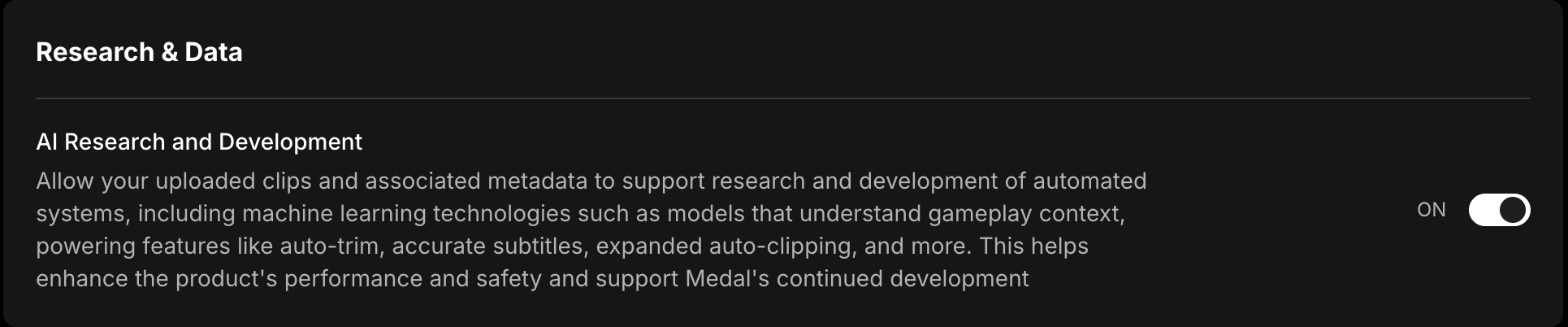
While AI Research and Development is turned on, Medal may use your uploaded clips and associated metadata to support research and development of automated systems. If you don't want this, you can turn it off at any time. Your choice applies to your account on both the desktop app and medal.tv.
This setting was previously found under Privacy & Security > Privacy & Visibility. It now has its own Medal AI page in Settings.
How to Opt Out
- Open Settings: Make sure you're logged in, then open Medal's settings on the desktop app, or go to medal.tv/settings/medal-ai on the web.
- Go to Medal AI: In the left sidebar under User Settings, select Medal AI.
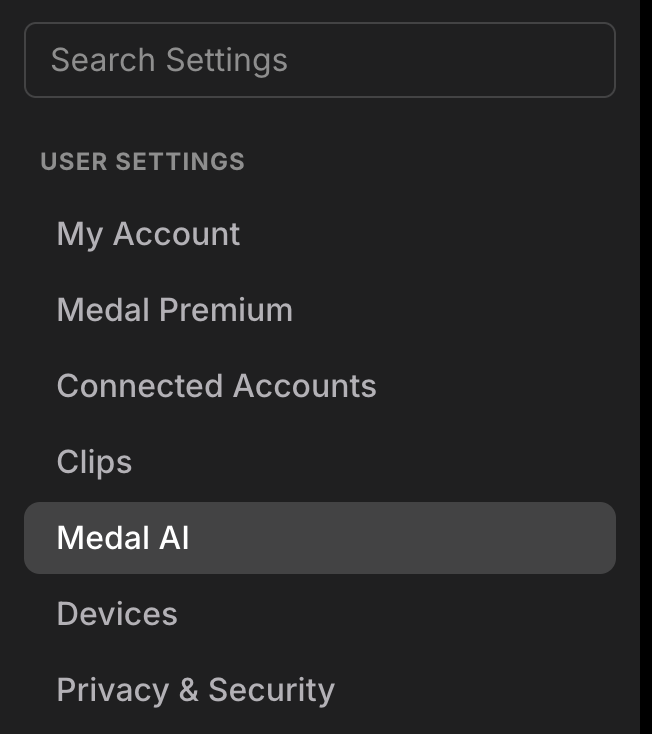
- Find AI Research and Development: It's the first setting, under Research & Data.
- Turn it off: Click the switch so it shows OFF. Your choice saves automatically.
Was this article helpful?
That’s Great!
Thank you for your feedback
Sorry! We couldn't be helpful
Thank you for your feedback
Feedback sent
We appreciate your effort and will try to fix the article